
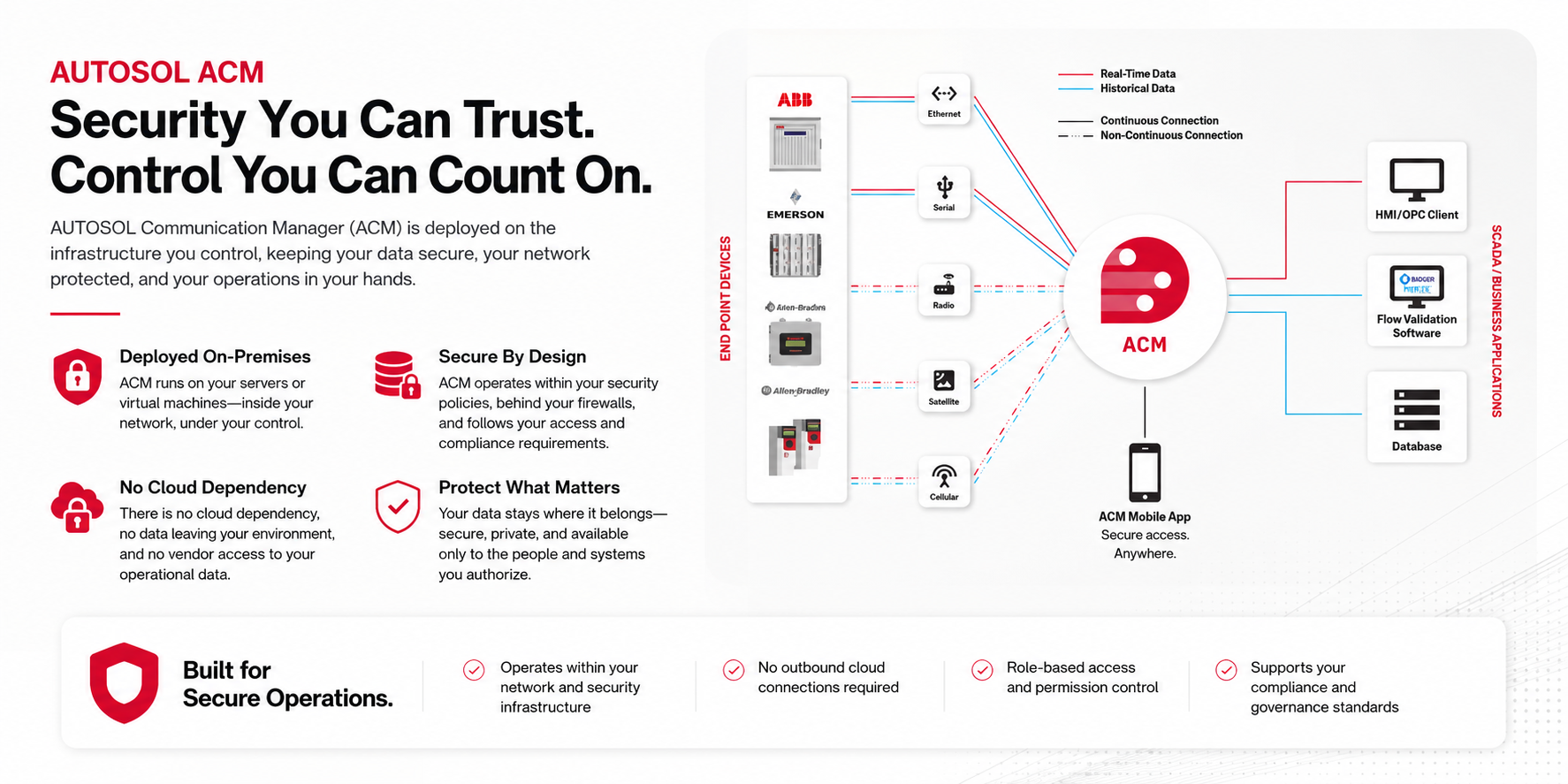
ACM is software you own, deployed on infrastructure you control.
ACM runs on your servers or virtual machines, inside your network, under your security policies. There is no cloud dependency, no data leaving your environment, and no vendor access to your operational data.
Deployment Model
ACM is installed directly on a server or virtual machine that you own and manage. It runs as a Windows service. All data stays within your network.
- Your infrastructure, your control. AUTOSOL has no remote access to your ACM instance or your operational data. The software runs entirely within your environment. No data is transmitted to AUTOSOL or any third party.
- Supported environments. ACM runs on Windows Server versions still under active Microsoft support. Physical hardware or VM deployments are both supported. AUTOSOL only supports Microsoft current OS versions to ensure your host environment remains on a maintained, patched platform.
Access Control and Authentication
Windows Active Directory integration
ACM users are tied directly to Windows accounts or Windows Group accounts. There are no separate ACM passwords to manage. Access is inherited from your existing AD infrastructure; ACM access is automatically revoked when a Windows account is disabled or removed.
Role-based access control (RBAC)
Each user is assigned a role. Roles define granular permissions: create, modify, delete, execute commands, and configure security objects. Roles can be scoped server-wide or overridden at the folder level for finer control over specific device groups.
- Users with no permissions assigned have read-only access by default, and no accidental configuration changes
- Windows administrators can be granted full ACM access without a separate ACM user object
- Security can be enabled or disabled at the server level, managed by a user with Configure Security privileges only
- Folder-level security overrides allow access restriction to specific device groups without changing server-wide roles
Audit Trail and Logging
- Log Viewer. ACM includes a built-in Log Viewer that captures every poll attempt, protocol event, communication error, and data path event in real time. Logs are accessible from within the ACM Configuration Client and can be used to audit system activity and diagnose issues.
- Reporting. The ACM Reporting Tab provides access to historical data reports and scheduled report generation. Reports can be used to verify data collection completeness, support compliance reviews, and document operational activity over time.
Data Handling and Vulnerability Management
No external data transmission
ACM does not transmit operational data to AUTOSOL or any external party. All data is stored locally in your database (SQL Server or SQL Express) and published only to destinations you configure within your network, SCADA, historian, or IIoT platform.
Security announcements and CVEs
AUTOSOL maintains a Security Center with published security advisories and CVE-related announcements. When vulnerabilities are identified, AUTOSOL issues guidance and patches through its standard release process. Your IT team can monitor the Security Center directly.
- ACM database runs on Microsoft SQL Server or SQL Express, subject to your organization's existing database security policies
- ACM is only supported on Microsoft's current OS versions, keeping the host within the Microsoft security patch lifecycle
- Security updates and patches are delivered through ACM's regular release cycle; full release history available in ACM documentation
IT Security Quick Reference
Authentication
Windows AD integration
No separate ACM passwords
Role-based access control
Folder-level permissions
Data and Network
On-prem / VM only
No external data transmission
SSL / TLS connection option
OPC UA with TLS 1.2
Compliance and Audit
Built-in Log Viewer
Scheduled reporting
Published CVE advisories
Microsoft patch lifecycle
Additional details available on request
Full port requirements for your specific device protocols, anti-malware exclusion lists, the AUTOSOL Security Center, and OPC UA certificate configuration details are available from your AUTOSOL account team.